Reimagining Design audits with AI + human judgment
Transforming manual design audits into an AI-assisted workflow through intelligent visual detection and designer-controlled review systems.
Role
Product Designer, End-to-End
Timeline
August 2025 - Present
Scope
0 → 1
Domain
Enterprise SaaS, AI Powered Tools, Design QA Automation
This is an active project under development at the company certain details, data, and visuals have been simplified or abstracted to respect confidentiality. The case study focuses on design process and decision-making.
# Overview
At a Glance
A full design audit cycle at a large enterprise financial data platform - comparing 10-20 screens against Figma, diagnosing issues, writing fixes, compiling reports - took half a working day or more. This tool uses computer vision and AI to detect discrepancies and generate descriptions automatically, in minutes, while designers control what gets flagged.
The project was owned end-to-end, from research through build -but not in isolation. Engineering guided technical feasibility, product helped prioritize scope, and stakeholders saw demos at multiple stages, each shaping the next iteration.
# Context
UI audits are the last line of quality defense - and they were breaking
The design quality depended on UI audits - comparing what was built in production against what was designed in Figma. This was critical for product launches, compliance reviews, and design system consistency.
But the process was deeply broken …
THE REALITY
30–45 minutes per screen for the first screens in a flow, gradually reducing as issues repeated
Each issue needed a diagnosis and a fix - correct pixel values, correct components, UX recommendations
Everything compiled manually into a PPT or Figma file as a handoff deliverable
Sometimes a follow-up call with engineers to walk through findings
Full audit cycle: half a working day or more
WHAT’S NEEDED
Speed - Audits needed to be completed in minutes, not hours or days
Consistency - Same format, every time
Visual grounding - Show exactly what's wrong
Designer control - Al assists, humans decide
Handoff-ready output - Engineers get what they need without assembly
Design Hypothesis
If we combine computer vision (for detection) with AI reasoning (for understanding) and human judgment (for decisions), we can reduce audit cycles from half a day to under an hour - while giving engineers a better deliverable than they were getting before.
# The Approach
Which approach won? ...the one that kept a human in the loop.
Three directions were tested against the same screen before landing here. Full automation looked fastest, but it wasn't trustworthy enough to skip a human step, so the winning system builds review in rather than designs around it. Here's the research that led there, and the decision points that shaped it.
# Secondary Research
Why build from scratch? …because nothing out there fit.
Before starting building, the first question was: does a tool for this already exist? A scan of existing tools surfaced options - but none fit. Here's why:
Pixel-diff tools like BackstopJS and Playwright's screenshot comparison flag every pixel change with no sense of design intent or severity - high noise, low signal, and no way to encode our own design system rules.
AI-powered review platforms like Applitools Eyes and Percy process visual analysis in the cloud, meaning screenshots leave our infrastructure. With sensitive financial data on every screen, that was a non-starter.
This ruled out buying and made the case for building - a custom tool that keeps data in-house and understands the design system.
# Primary Research
14 interviews. 3 disciplines. A much clearer picture.
Interviews across design, product, and engineering revealed how audits actually worked - surfacing pain points and hidden assumptions no competitive scan could uncover.
10 designers across 4 product teams - the people doing audits daily. 2 PMs and 2 engineers - the people consuming audit reports and implementing fixes said ...
"I spend more time taking screenshots than actually finding issues."
- Designer
"If I can't see exactly where the issue is, the report is useless to me."
- Engineer
"Every designer's audit looks different. I can't compare quality across teams."
- Product Manager
Three disciplines, one shared frustration: designers wanted speed, engineers wanted precision, PMs wanted consistency. The solution needed to serve all three.
# Brainstorming
Three phases - each shaped by what I learned from the last …
Three distinct approaches were built and tested, auditing the same screen across all three to compare output quality directly. The two that didn't fully work are where most of the real design learning happened.
01
Didn’t work
Text-only AI
Analyzed screenshots against design rules using GPT. Quick to build, zero visual evidence - low trust.
AI without visual context fails for spatial problems.
02
Partially work
Computer vision
Pixel-level comparison with bounding boxes. Trust went up, but false positives were high.
Detection without context creates noise.
03
Current
Hybrid system
Combined OpenCV + GPT-4o + human review layer. Designers stay in control.
The best AI system keeps humans in the loop.
# Key decisions
Four bets that shaped the solution
None of these were obvious at the start - each came out of watching where the earlier prototypes lost designers' trust.
Human-in-the-loop over full automation
Local-first processing, even though it slowed things down
Callouts over bounding boxes
Side-by-side with synced views
# The first working prototype
From idea to working tool
The mvp tool runs locally - keeping all data in-house. It compares Figma designs against live builds using OpenCV for detection and GPT-4o for generating human-readable issue descriptions.
Compare: the screens side-by-side with bounding boxes
Figma on left, production screen (UAT) on right, with red bounding boxes highlighting detected discrepancies. This is the core interaction - designers see exactly what the AI found and verify it against the original design.


AI-generated issue descriptions, mapped to each flagged region
Analyze - AI-generated issue descriptions
Each detected region gets a human-readable description from GPT-4o - for eg. "Component misaligned by 10px to the right." Precise language designers would otherwise spend time writing manually.
Detection sensitivity is tunable per audit - designers adjust thresholds to cut noise for their screen.

# Behind the build
The prototype was built solo, with help from AI
The working prototype - Python scripts, OpenCV detection logic, a Streamlit interface - was built using ChatGPT as a coding partner for implementation, with architecture and product decisions (detection approach, issue phrasing, review workflow) driving the build. An engineer stepped in when technical challenges went beyond what AI-assisted development could resolve alone.
# Learnings
What the prototype revealed
Building and testing the Streamlit MVP surfaced usability gaps that no amount of upfront design could have predicted:
Detection isn't the hard part - review is. Designers had no way to accept, reject, or edit results. Without that kind of control, they didn't trust the output.
Information density over aesthetics. 10-20 screens per session means scan fast, act fast, move on. The prototype required too many uploads and clicks.
The report is the real deliverable. What engineers receive matters more than what designers see. The prototype had no way to package its output.
Not every input should be automated. Figma references can be fetched via URL. Live environments need manual capture - designers perform specific actions before screenshotting. Automate the reference, keep control on the build.
# Design Solution
From prototype to product
The Streamlit MVP proved the concept. These screens translate it into a production-ready interface.
Due to NDA constraints, the actual production screens cannot be shared. These were recreated for the purpose of this case study using AI-assisted design, reflecting the same design decisions and workflows.
Set up once, audit at scale
Figma reference pulled by URL. Live environment captured manually. Multiple screens queue into one audit - no more running them one at a time.

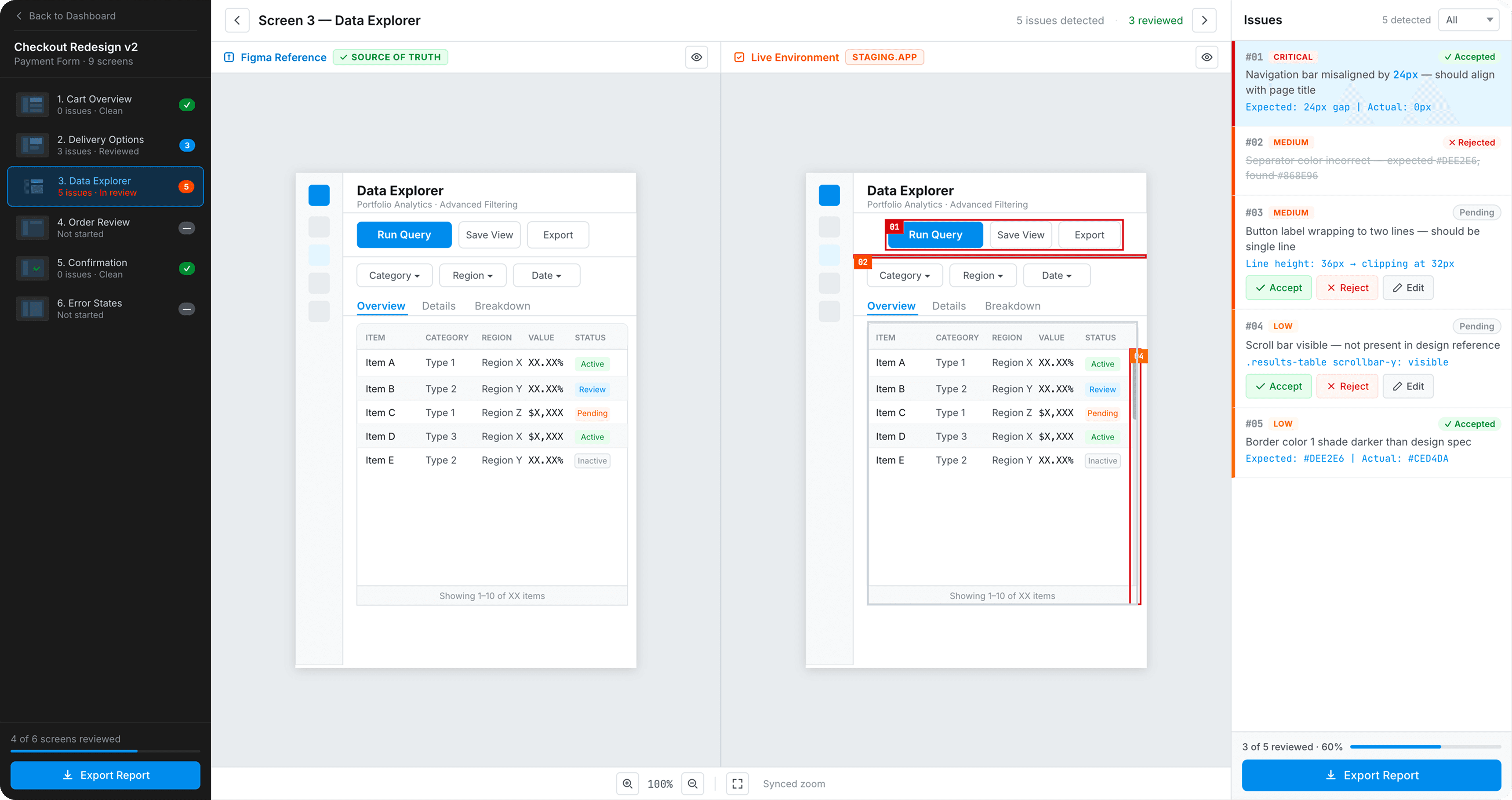
Trust, but verify
Every issue is concrete - "Navigation bar misaligned by 24px, expected gap 24px, actual 0px." Accept, reject, or edit each one.
Rejected issues stay visible, struck through - the trail shows what was dismissed, not just what was kept.

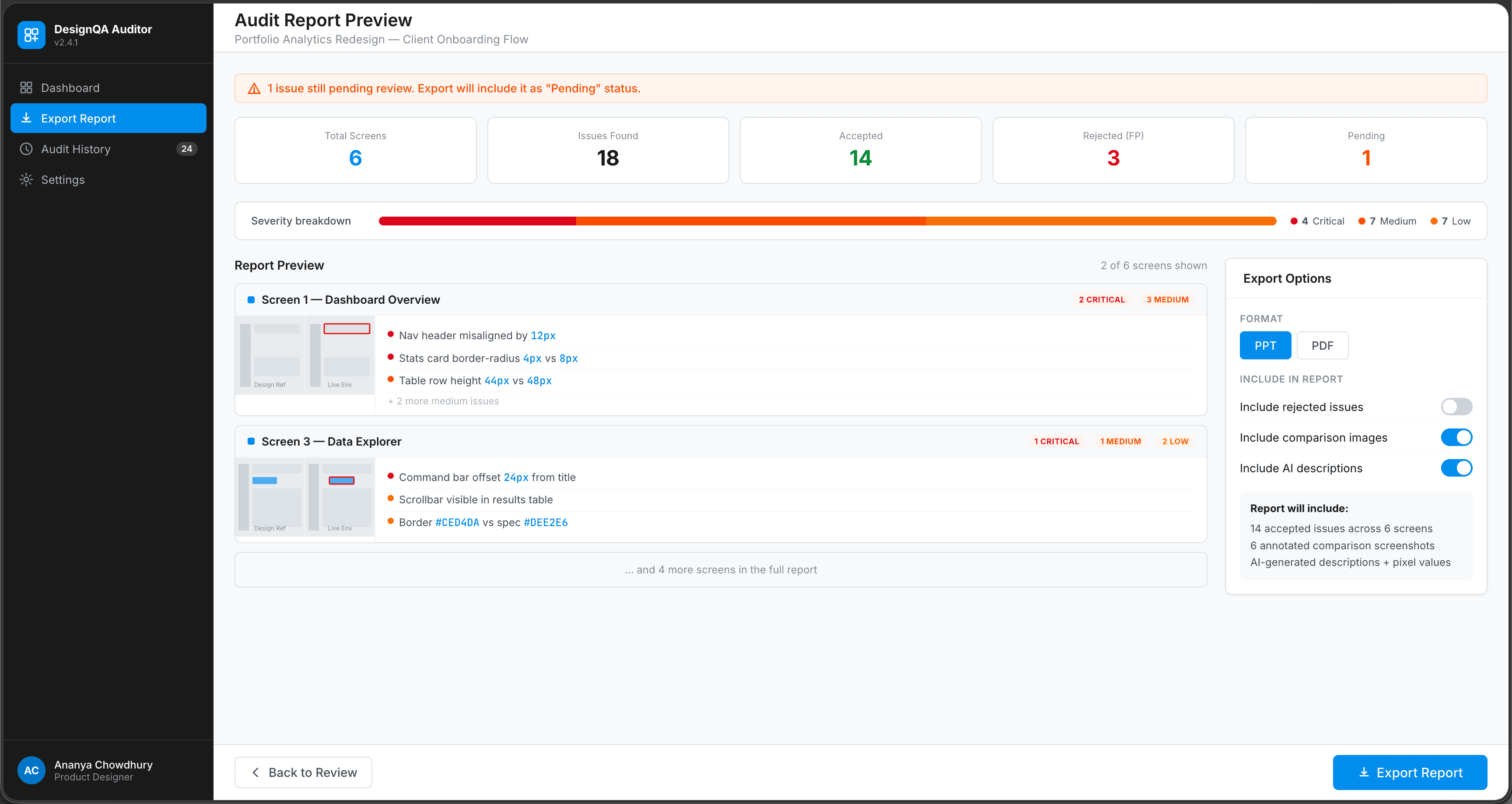
From decision to deliverable
The report builds itself - screens audited, issues found, accepted vs. rejected, each traceable to a pixel value. Configurable export to PPT or PDF. What used to take three-plus hours now takes one click.
# Edge cases
What happens when AI is wrong
No AI system is perfect. Designing for failure states was critical - because how a tool handles errors defines whether users trust it.
False positives
Problem: Non-issues (dynamic content, sidebars) flagged as differences.
Solution: Added region masking and confidence thresholds to filter noise.
Missed critical issues
Problem: Subtle alignment and spacing issues were overlooked.
Solution: Introduced rule-based checks (spacing, alignment, typography) alongside OpenCV.
GPT hallucinations
Problem: Incorrect or speculative AI descriptions.
Solution: Enabled edit in review layer and refined prompts for accuracy.
Designer skepticism
Problem: Lack of trust in AI-generated output.
Solution: Linked each issue to visual evidence for easy verification.
# Outcomes
What's happened so far
Audit time: half a day → under an hour. Manual audits meant diagnosing issues, writing fixes, compiling reports, sometimes walking engineers through it. For 10–20 screens, that was half a working day. In testing, each screen was processed in under 5 minutes.
Validated enough to get funded. The production team saw the prototype and greenlit it. As of my last day on the team, this was roadmapped for Q4 production, with dedicated engineering and product resources already allocated, a shift from "interesting side project" to a resourced initiative.
½ day → <1hr
Full audit cycle reduced
30min → <5min
Per-screen audit time
10–20
Screens per audit cycle
Q4 2026
Moving into production
# What's next
From prototype to production
Moving from designer-built prototype to a properly engineered product. Currently designing the production UI in Figma, refining detection accuracy with different OpenCV configurations, and exploring newer vision models to reduce hallucinations. Still figuring out: direct Figma API integration, severity classification (critical vs cosmetic), and audit history for tracking quality over time.
# Reflections
What this project is teaching me …